Say you want a chatbot on your personal site: one that answers visitors’ questions from your own pages and links to the page behind each answer. The usual options both cost money every month:
- A hosted chatbot builder. Quick to set up, but past a small free plan you pay a monthly fee, and the free plans usually cap messages or show the vendor’s branding.
- Hosting it yourself. A server for the vector database and the API, plus a model, either on that server or through a paid API. Even a small server is a monthly bill, and running a capable model yourself takes far more than a small server.
For a personal site with a handful of visitors a day, neither makes sense. So I looked for a setup that costs nothing to run, and found two. Both run entirely on free tiers, with no card on file, and they differ in one piece: the vector database, Qdrant Cloud or Upstash Vector.
I built both, identical except for that piece. This post covers what each setup gives you for $0, then compares the two databases head to head. Both are live: the Qdrant one and its Upstash twin. The case study covers the design, and Part 2, a step-by-step guide to building your own, is coming next week.
The short answer
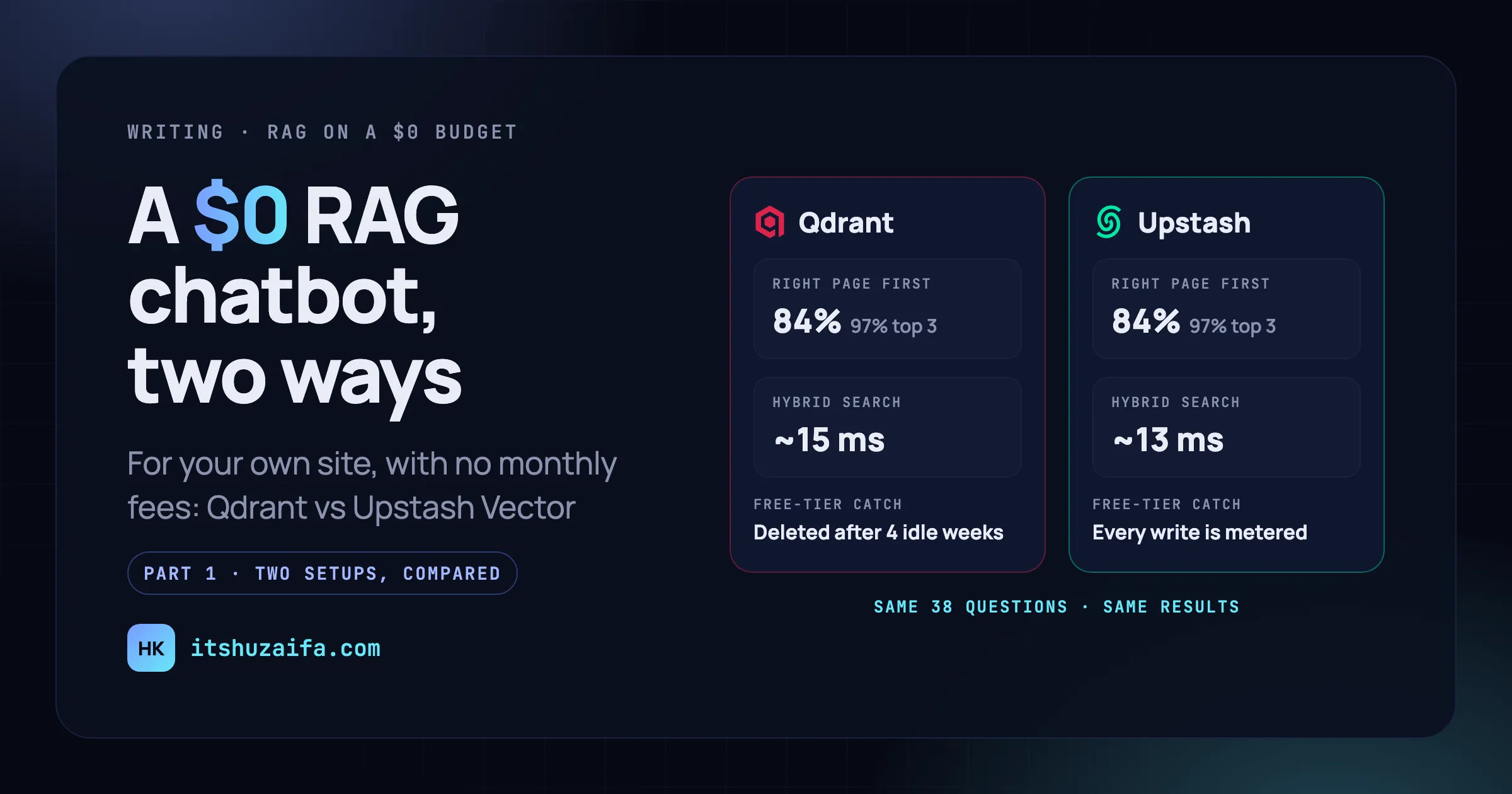
You can run a RAG chatbot on your site for $0, and either database works. At this size, the database changed nothing about search quality or speed. Both scored identically on 38 test questions, to the third decimal, in every search mode. A hybrid search took 13 to 15 ms from the API server, and the database itself spent about a millisecond of that.
What did differ was local development, how much you can tune, and the free-tier rules. Qdrant deletes a free cluster that sits idle. Upstash never sleeps, but counts every vector you write. Pick the one whose rule your project can live with.
The $0 stack
Every piece is either a free tier or an open model:
| Piece | What I used | What it costs |
|---|---|---|
| Content | The site’s own pages, as one llms-full.txt file |
Nothing: the site generates it |
| Embeddings | bge-small-en-v1.5 for meaning and BM25 for keywords, via FastEmbed |
Open models, run on the CPU inside the API |
| Vector database | Qdrant Cloud’s free cluster, or Upstash Vector’s free index | Free tier, no card |
| Answers | gpt-oss-120b on Groq |
Free tier, no card |
| API and chat window | FastAPI on Vercel’s Hobby plan | Free for personal, non-commercial projects |
| Re-indexing | A GitHub Action, every night | Free Actions minutes |
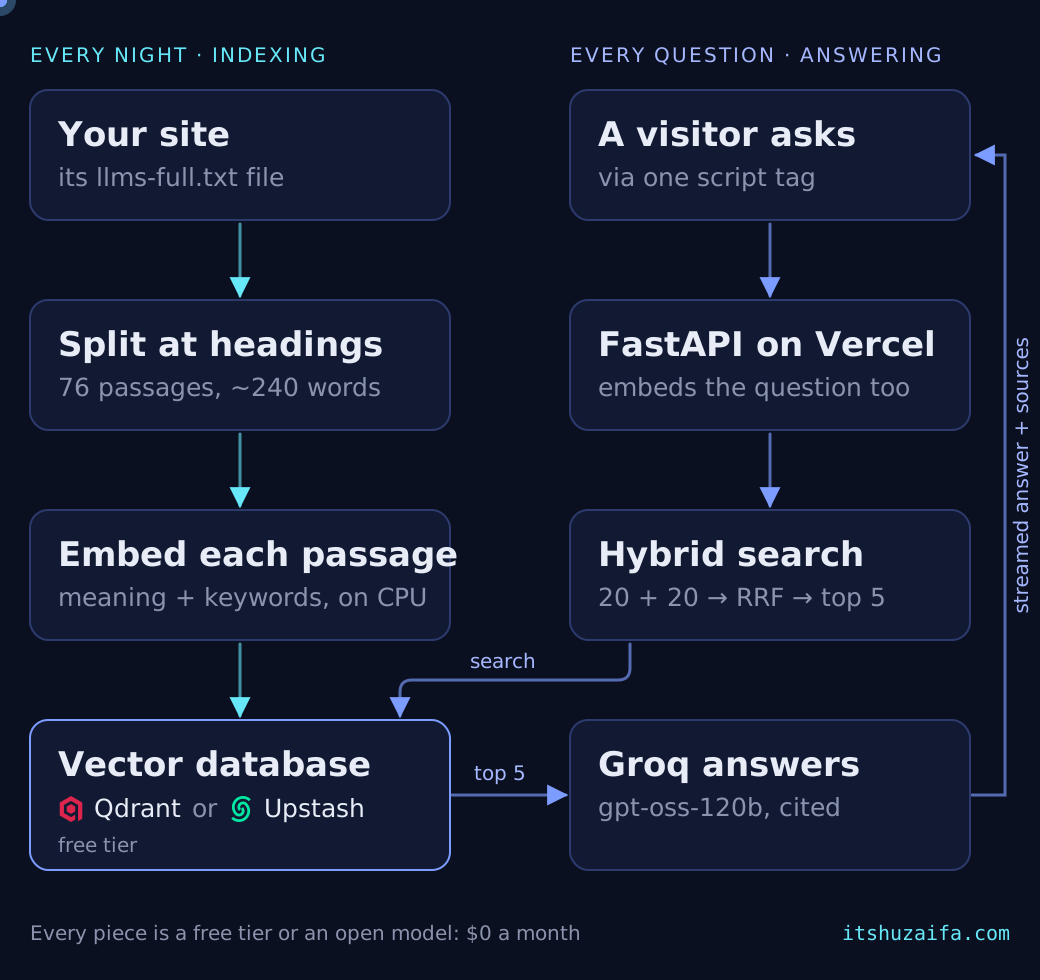
How it fits together: every night, the site’s content is split at its headings into passages (76 for my site), and each passage is embedded twice and stored in the database. When a visitor asks something, the question is embedded the same way, and a hybrid search takes the 20 best passages by meaning and the 20 best by keywords and fuses them with Reciprocal Rank Fusion (RRF) into the top 5. Groq then writes a short answer that cites them. One script tag adds the chat button to the site.
What $0 gets you, and what it doesn’t
- About 150 answers a day, around 5 a minute. Groq’s free tier allows 200,000 tokens a day and 8,000 a minute per account, and one answer uses about 1,000 to 1,600 tokens: five passages, the question, and the reply. That’s plenty for a personal site. When it runs out, the chat shows a fallback link (mine says “Book a call”) instead of an error.
- A slow first answer after a quiet spell. When the function has been idle, the first answer takes 4 to 5 seconds to start while Vercel boots it and loads the models. Warm answers start in about 1.3 seconds, measured from my laptop in Pakistan, with most of that being the trip to the US and back.
- A little housekeeping. Qdrant’s free cluster needs a sign of life every week, and Upstash meters writes. More on both below.
- Personal use only. Vercel’s Hobby plan is for non-commercial projects, so a business site would need a paid plan or another host.
Keeping the comparison fair
That’s what $0 gets you. The rest of this post is the comparison: which database should hold your passages?
The two repositories are copies of each other. The parser, chunker, embedding code, prompt, API, chat window, and tests are byte-for-byte identical. Only one file differs: store.py, the 70 or so lines that talk to the database.
Everything else was held equal:
- the same 76 passages, with the same IDs and the same vectors
- the same fusion: RRF with k = 60, 20 candidates from each side, the top 5 kept
- the same tie-break (more on why below)
- both databases in AWS us-east-1, next to the Vercel function in Washington, D.C.
To measure search quality, I wrote 38 questions about this site, each listing the pages that answer it. I wrote 26 of them knowing the pages, and 12 paraphrased, the way a visitor would ask (“Who would own the software we pay for?”). Each question gets four scores:
- hit@1: the right page is ranked first.
- hit@3: it’s in the top 3.
- hit@5: it’s among the five passages the answer model reads.
- MRR (mean reciprocal rank): 1 point for first place, ½ for second, ⅓ for third, and so on, averaged. 1.0 is perfect.
At a glance
| Qdrant Cloud | Upstash Vector | |
|---|---|---|
| Search quality (hit@1 / hit@3 / MRR) | 0.84 / 0.97 / 0.900 | 0.84 / 0.97 / 0.900 |
| Hybrid search from Vercel (median) | ~15 ms | ~13 ms |
| First answer after sitting idle | ~5.0 s | ~4.4 s |
| Local development | Docker, with a dashboard | None, cloud only |
| Sign-up to a working index | ~5 minutes (under 1 locally) | 4 to 5 minutes |
store.py |
70 lines | 69 lines |
| Hybrid search setup | Declare both vectors in code | Pick “Hybrid” in a form |
| Things you can tune | Fusion k, HNSW, candidates per side | Nothing |
| Free tier | 1 cluster: 1 GB RAM, 0.5 vCPU, 4 GB disk | 1 index, 10,000 requests a day |
| Free-tier catch | Suspended after 1 idle week, deleted after 4 | Every written or deleted vector is a request |
| Python client | gRPC and HTTP | Plain HTTP |
Here’s each row in detail.
1. Search quality: identical
| Search mode | Qdrant | Upstash |
|---|---|---|
| Hybrid, RRF (the chatbot’s choice) | 0.84 / 0.97 / 1.00 / 0.900 | 0.84 / 0.97 / 1.00 / 0.900 |
| Hybrid, DBSF | 0.87 / 0.95 / 0.97 / 0.914 | 0.87 / 0.95 / 0.97 / 0.914 |
| Meaning only (dense) | 0.76 / 0.89 / 0.97 / 0.842 | 0.76 / 0.89 / 0.97 / 0.842 |
| Keywords only (BM25) | 0.79 / 0.92 / 0.92 / 0.851 | 0.79 / 0.92 / 0.92 / 0.851 |
hit@1 / hit@3 / hit@5 / MRR over 38 questions.
That’s not a coincidence. With a few thousand vectors, both databases compare the question against every vector: an exact search. The approximate indexes where databases really differ, like HNSW, only start at larger sizes. Qdrant doesn’t even build its HNSW index until a segment holds 10 MB of vectors, about 6,500 passages at 384 dimensions. My site’s vectors came to 117 KB. Upstash’s own documentation, which I indexed as a stress test, came to 5,061 passages and 7.8 MB, still under the line.
Same vectors, exact search, and the same fusion formula give the same results. I checked Upstash’s RRF by recomputing its fused scores from the separate dense and keyword lists: it’s 1 / (60 + rank), with ranks counted from 0, matching to nine decimal places. That’s exactly what Qdrant does with k = 60.
So search quality came from the pipeline, not the database. What made the difference:
- Hybrid search. Keywords alone did well on questions that reuse a page’s words, then collapsed on paraphrases (hit@1 fell from 0.92 to 0.50). Meaning alone was never the best mode. RRF was the only mode that put the right page in the top 5 for all 38 questions.
- RRF over DBSF. DBSF, the other fusion method both databases offer, won my first 26 questions (hit@1 0.96 against 0.88), but its lead came from keyword-friendly wording. On the paraphrased questions, RRF was better (0.75 against 0.67). DBSF follows whichever search is more confident, and keyword search is confidently wrong when the visitor’s words differ from the page’s: a question asking whether any articles had been written dropped out of DBSF’s top 5 entirely.
- A clean source file. When I crawled the site instead of reading its
llms-full.txt, hit@1 fell from 0.84 to 0.66, on both databases. The page extractor dropped the tool names from a card grid and mixed the FAQ into the About page.
2. Speed: the database is the smallest part
The API runs on Vercel in Washington, D.C., and both databases in AWS us-east-1 next door. These timings come from the function’s own logs:
| Inside Vercel | Qdrant | Upstash |
|---|---|---|
| Hybrid search, warm (median) | ~15 ms (max 17) | 13 ms (max 21) |
| A tiny query: the health check (median / p95) | 4.7 / 11.3 ms | 3.2 / 37.0 ms |
| Embedding the question, warm | ~14 ms | ~16 ms |
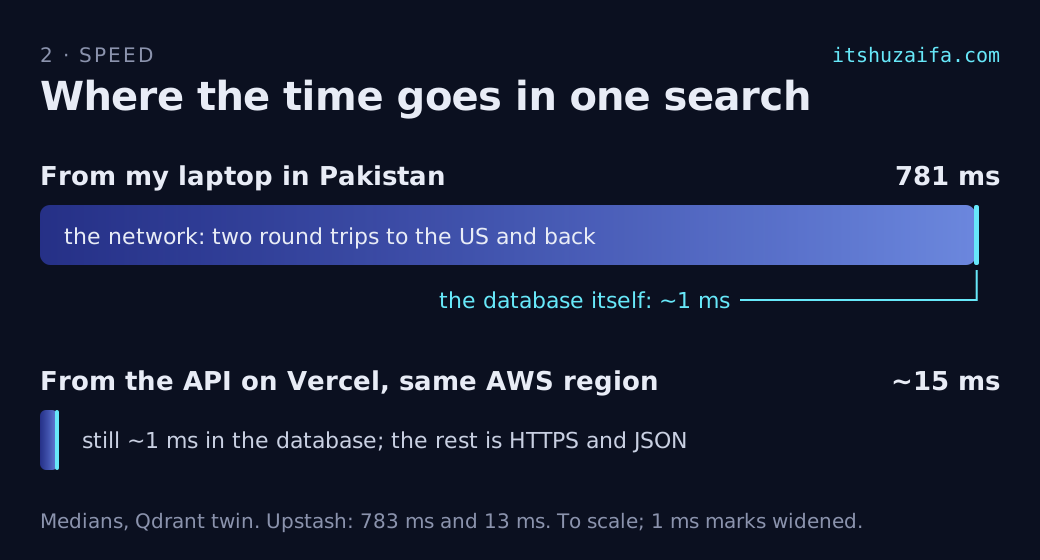
Inside either database, a search takes about a millisecond. The rest is the HTTPS round trip and 10 to 20 passages of text coming back as JSON.
What a visitor feels is different, so I also measured from my laptop in Pakistan:
| From Pakistan to the US | Qdrant | Upstash |
|---|---|---|
| Search alone (median / p95) | 781 / 894 ms | 783 / 889 ms |
| Answer, first words (median, warm) | 1.35 s | 1.29 s |
| Answer, complete (median, warm) | 1.57 s | 1.51 s |
| First answer after ~20 idle minutes | 4.99 s | 4.36 s |
A search from Pakistan takes about 780 ms on both, and it’s nearly all network: an empty request’s round trip alone was 371 ms. In an answer, the time goes to the network and to Groq, whose speed varied from call to call: the first words left the server anywhere from 0.45 to 2.4 seconds after the request arrived.
Cold starts cost both about 3 to 4 seconds. I had one sample each, so the 0.6-second gap is noise. In the Qdrant twin, I traced where it goes: about 3.3 seconds pass before my code runs at all, while Vercel boots a large function and Python imports its libraries. The fix is a smaller bundle, not a faster database.
The samples are small (6 to 8 chats and 50 health checks per twin), so treat them as orders of magnitude, not a ranking. The honest summary: a tie.
3. Setup and local development
Qdrant runs on your laptop. One docker compose up -d gives you the same version as the cloud (I pinned 1.19.2 for both) and a dashboard to browse every stored passage. Experiments were quick: a search took about 4 ms locally, collection settings changed in place with one request, and nothing counted against a quota. Moving to the cloud took two settings, the cluster URL and a key, and no code changes. The eval scored exactly the same.
The cloud setup took about five minutes: sign in, a short profile form, create a free cluster, create keys. No card.
Upstash has no local version. Setup is one form in its console: a name, a region, the type (Hybrid), and the dense vector’s size and metric (384, cosine). Four to five minutes, no card, nothing to install or keep running. But every search during development is a round trip to the cloud (about 700 ms from Pakistan), and every re-index spends from the daily quota.
Surprise: the free plan allowed one index. When I set it up, the pricing page said up to ten, but the console refused a second (“You can have at most 1 resource(s)”) until I added a payment method. So development and production share one index, kept apart by namespaces (100 on the free plan). Qdrant’s free tier is also one cluster, but a cluster holds any number of collections, so in practice the two end up equivalent.
4. The code: two ways to say the same thing
Both store.py files do the same four jobs: write the passages, remove stale ones, search, and count. Qdrant takes 70 lines, Upstash 69.
Creating a hybrid index
In Qdrant, you declare both kinds of vector when you create a collection:
client.create_collection(
    "itshuzaifa",
    vectors_config={
        "dense": models.VectorParams(
            size=384, distance=models.Distance.COSINE
        )
    },
    sparse_vectors_config={
        "sparse": models.SparseVectorParams(modifier=models.Modifier.IDF)
    },
)
The IDF modifier makes rare words count for more than common ones, which turns raw word counts into BM25 scores.
In Upstash, you pick Hybrid in the console and write no code. Every vector you store then needs both parts: a hybrid index rejects one without its keyword vector.
Searching
In Qdrant, a hybrid search is one query with two prefetches and a fusion step:
client.query_points(
    "itshuzaifa",
    prefetch=[
        models.Prefetch(query=dense, using="dense", limit=20),
        models.Prefetch(query=sparse, using="sparse", limit=20),
    ],
    query=models.RrfQuery(rrf=models.Rrf(k=60)),
    limit=10,
)
In Upstash, it’s one query that carries both vectors:
index.query(
    vector=dense,
    sparse_vector=sparse,
    top_k=20,
    include_metadata=True,
    include_data=True,
    namespace="itshuzaifa",
    weighting_strategy=WeightingStrategy.IDF,
    fusion_algorithm=FusionAlgorithm.RRF,
)
The gotchas
Each of these gave me a wrong result before I found it.
Qdrant:
- RRF’s k defaults to 2, not the usual 60. You set it with
Rrf(k=60)(Qdrant 1.16 and later). Interestingly, k = 2 scored a little higher on my questions (hit@1 0.87 against 0.84, MRR 0.930 against 0.900), because a small k trusts the top of each list more. I kept 60 so both twins fused the same way. Being able to tune it at all is a point for Qdrant. - Exact ties come back in random order. RRF scores often tie (ranks 1 and 3 add up to the same as 3 and 1). In 11 of 38 questions, the order changed between identical searches, so one score read 0.58 on one run and 0.75 on the next. The fix is to fetch a few extra results and sort them by score, then by ID. Upstash returns ties in a fixed order, but I kept the tie-break in both, so they always pick the same passages.
Upstash:
- IDF is an option on every query. Leave out
weighting_strategy=IDFand keyword search quietly scores raw word counts instead. There’s no error. top_kis also the number of candidates fused from each side. Withtop_k=5, it fuses only the top 5 by meaning and the top 5 by keywords. That changed the top 5 for 30 of 38 questions, compared with fusing 20 from each side. Ask for 20 and keep the best 5.- Writes are indexed in the background. Right after an upsert, a rewritten vector counts as both stored and pending, so the count said 77 for 76 passages. I poll
info()until nothing is pending, which is what Qdrant’swait=Truedoes for you.
Keeping the index in sync
Every re-index has to remove passages from pages that were deleted or got shorter. Qdrant does it in one call, “delete everything I didn’t just write”:
written = [c.id for c in chunks]
stale = models.Filter(must_not=[models.HasIdCondition(has_id=written)])
client.delete("itshuzaifa", models.FilterSelector(filter=stale), wait=True)
Upstash has no “delete all except these”, so the code lists the namespace’s IDs with range (1,000 per page), compares, and deletes the leftovers by ID. That’s where Upstash’s lines go. Qdrant spends its lines creating the collection instead.
One point the other way: Upstash filters on any metadata field with no setup, while Qdrant wants a payload index for each field you filter on. I created one for type.
5. Free tiers: two different catches
| Qdrant Cloud | Upstash Vector | |
|---|---|---|
| What you get | 1 cluster: 1 GB RAM, 0.5 vCPU, 4 GB disk | 1 index, 1 GB, 100 namespaces |
| Requests | Not metered | 10,000 a day. Each written or deleted vector counts as one; a search counts as one |
| When it sits idle | Suspended after 1 week, deleted after 4 | Nothing happens |
| Card needed | No | No |
| Read-only keys | Yes, and they can be limited to one collection | Yes, a read-only token |
Qdrant’s catch is idleness. A free cluster that nobody uses is suspended after a week and deleted after four. A portfolio chatbot can easily go quiet for that long. My fix is a Vercel Cron that calls the chatbot’s health check every day, which runs a tiny query against the cluster, plus the nightly re-index. If the cluster were deleted anyway, rebuilding takes about five minutes: a new cluster, new keys, one re-index. Note that the cron keeps Qdrant awake, not the Vercel function, so it doesn’t help with cold starts.
Upstash’s catch is write metering. Every vector you upsert or delete is one request out of 10,000 a day. My nightly re-index writes 76 vectors, under 1% of that. But Upstash’s own documentation, at 5,061 passages, would spend half a day’s budget on every re-index, so I didn’t index it there (Qdrant took it with no trouble). A large site on Upstash would need to skip unchanged passages, for example by comparing a content hash before writing.
The real ceiling was neither database. It’s Groq’s token budget, covered above: about 150 answers a day. That’s why each answer reads five passages instead of the whole site.
6. Deploying on Vercel
Both twins deploy as one FastAPI function on Vercel’s free plan, and both are too big for its standard path. The embedding models (about 65 MB) and their runtime (onnxruntime and numpy, over 120 MB together) are the same in both. The database client is the difference:
| Qdrant | Upstash | |
|---|---|---|
| Python packages Vercel installs | 210 MB | 189 MB |
| Why | qdrant-client brings gRPC |
upstash-vector is plain HTTP |
| With the models | Over the 225 MB limit | ~254 MB, still over |
Vercel’s builder caps a standard function at 225 MB, so both need the VERCEL_SUPPORT_LARGE_FUNCTIONS=1 setting, which is in beta and works on the free plan.
Upstash can also embed for you. It hosts bge-small-en-v1.5 and a BM25 model, so you can send text instead of vectors. That would drop FastEmbed, onnxruntime, and the models, about 200 MB, and with them most of the cold start. I didn’t use it, because both twins had to embed with the same code. If I were building on Upstash alone, I’d try it first.
7. Which one I’d pick
Pick Qdrant if:
- you want to develop locally and offline, with a dashboard
- you want to tune: the fusion k, the HNSW settings, how many candidates each side contributes
- your content is large or changes often, since writes aren’t metered
- something will use it at least weekly (a daily ping is enough), or you can live with rebuilding it
Pick Upstash Vector if:
- you want no setup and no risk of the database disappearing
- your content is small or rarely changes, so writes stay well under 10,000 a day
- you want to try its hosted embeddings to shrink a serverless function
- you prefer plain HTTP with no connection to manage
For a personal site, either is fine. The chatbot on this site uses Qdrant, and switching it to the Upstash twin is one line in the site’s settings.
What I learned
- Measure search before tuning anything. Writing 38 questions with the pages that answer them took about an hour, and it caught every mistake in this post: the k default, the random ties,
top_k, and one wrong label in my own answer key. - Hybrid search beats either half, especially on questions phrased differently from the page.
- The pipeline matters more than the database: chunking at headings, putting each page’s metadata in its first chunk, and a clean source file.
- Defaults are decisions. RRF’s k,
top_kdoubling as the candidate count, IDF being off unless you ask, and FastEmbed’s default batch size, which made embedding five times slower on a CPU (9.9 s against 1.8 s for 76 passages) because every text in a batch is padded to the longest. - On a free stack, the limits shape the design. Groq’s token budget set the five passages, Qdrant’s idle rule added a cron, and Upstash’s write metering would decide how a large site re-indexes.
Next week, Part 2 walks through building one for your own site, step by step, with either database. If you want the code before then, email me with your GitHub username and I’ll invite you to both repositories.